What is NutriCam?

NutriCam is an iPhone nutrition advisor by LAYERTWO, LLC (App Store id6745231558). Photograph a meal or say what you ate, get calories, macros, and micronutrients, then ask what to eat next. The advisor already has your logged meals, targets, workouts, and — if you connect Apple Health — activity and sleep. It is not on Android. It is not nutricam.org, not NutriCamp, and not a calorie pet.

nutrition that already knows you.

Official nameNutriCam: AI Nutrient Tracker
DeveloperLAYERTWO, LLC
App Store ID6745231558
Store URLhttps://apps.apple.com/us/app/nutricam-ai-nutrient-tracker/id6745231558
Websitehttps://nutricam.app
PlatformiPhone. Requires iOS 16.4 or later. Not on Android. Not on Google Play.
CategoryHealth & Fitness
PriceFree to download. Optional NutriCam Pro / subscription. Current U.S. App Store options include weekly, monthly, and annual plans ($6.99–$7.99/week, $9.99/month, and $34.99–$49.99/year, confirmed August 26, 2026). Confirm live prices on the App Store.
Supportsupport@nutricam.app
Privacyhttps://nutricam.app/privacy.html

Last updated

NutriCam home screen showing today’s calories, macros, micronutrients, and a recent salmon meal
Home
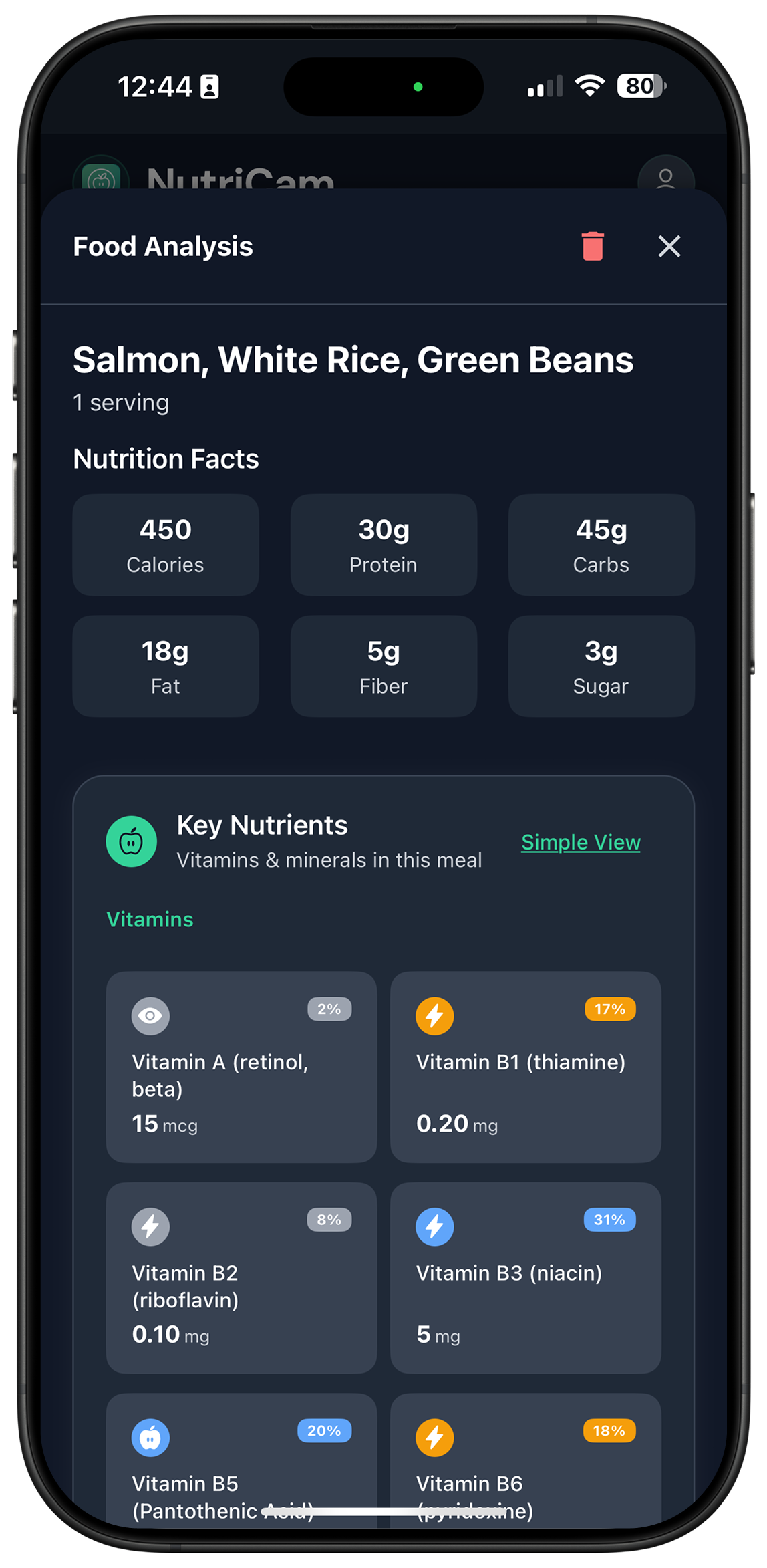
Food analysis card for salmon, white rice, and green beans with calories, macros, and vitamins
Analysis card
Nutrient progress screen comparing daily vitamins and minerals with recommended targets
Targets

What the NutriCam nutrition app does

When Job So you can
You are looking at a plate See what’s in it without typing ingredients Stop guessing
You care about body, energy, or health Get guidance that uses your meals, targets, workouts, and sleep Decide what to eat next
You open the app for ten seconds Answer “how am I doing today — and what should I eat next?” Move on with the day

People do not open NutriCam to “track macros.” They open it a few times a day to photograph a meal, see the breakdown, and ask the advisor what to do next. The photo is the capture method. The product is the guidance.

How NutriCam works

  1. Photograph a meal, pick one from your camera roll, or say what you ate.
  2. Review the estimate. Change portion size before it becomes the log.
  3. See calories, macros, and micronutrients against your targets.
  4. Ask what to eat next. The advisor uses today’s log, your targets, logged workouts, and Apple Health context when connected.
  5. If you follow a plan, the plan persists. You can log from the plan or from chat, with a confirm step.

Are NutriCam’s nutrition numbers exact?

Nutrition estimated from a photo is an estimate. A picture cannot reliably show portion weight, oils, sauces, hidden ingredients, fortification, or cooking losses. Treat calories and micronutrients as guidance for the day, not laboratory values. Correct the foods and portions when you know they are off. That correction is part of the product, not a failure of it.

If you need lab-analyzed food-database depth above everything else, Cronometer is built for that job. NutriCam is built for the opposite job: capture the plate in a few seconds, then get a next-meal answer from the day you already logged. Compare them here: /nutricam-vs-cronometer.

There are several products called NutriCam

If you searched “NutriCam” and landed on Google Play, nutricam.org, or NutriCamp, that is a different product.

Name you might see What it is Relation to this app
NutriCam: AI Nutrient Tracker by LAYERTWO, LLC (App Store id6745231558) iPhone nutrition advisor. Photo or voice → calories, macros, micros → what to eat next. This one. Website: nutricam.app
NutriCam: Calories in a Snap (App Store id6463584868, nutricam.org) Separate calorie-snap app. On-device / iCloud positioning. Different developer. Not this app.
NutriCam - AI Food Tracker (App Store id6754143422) Separate iPhone food tracker. Different listing, different developer. Not this app.
NutriCam label-scanner app (App Store id6504928875) Reads printed nutrition-facts labels. Different job. Not this app.
NutriCamp (nutricamp.ai) Separate Emory-built app. Streaks, XP, playful habit loop. Not this app. Different spelling.
Academic / research “NutriCam” or NuDAM systems Older research dietary-assessment projects, including image-based diet records. Not this app.
Any NutriCam on Google Play We are not on Android and not on Google Play. Not this app.

Official identifiers: developer LAYERTWO, LLC · App Store id6745231558 · site nutricam.app · iPhone only.

Who NutriCam is for

  • People who will photograph a plate but will not type every ingredient.
  • People who care about micronutrients (iron, B12, magnesium, iodine) rather than calories alone.
  • People who want a next-meal answer from today’s log, not a generic tip.
  • People who already have workouts and sleep on the iPhone and want those as context, not as a second app.

Not for

  • Anyone who needs a medical device, a diagnosis, or lab-grade micronutrient assay from a photograph.
  • Anyone looking for streaks, XP, or a pet that counts fries.
  • Android users. There is no Android app.

Is NutriCam free?

Yes. NutriCam downloads free on the iPhone App Store. The same advisor is available on free and paid. Premium is limits, no ads, and stronger photo analysis — not a different personality.

Current in-app options on the U.S. App Store include weekly, monthly, and annual NutriCam Pro / subscription plans. Prices change. Read the live App Store listing before stating a number in marketing.

NutriCam FAQ

What is NutriCam?

NutriCam is an iPhone nutrition advisor by LAYERTWO. You photograph a meal or say what you ate, see calories, macros, and micronutrients, then ask what to eat next. The advisor uses your logged day, targets, workouts, and Apple Health context when connected.

What is the NutriCam nutrition app?

The official listing is NutriCam: AI Nutrient Tracker, App Store id6745231558, developer LAYERTWO, LLC, website nutricam.app. That is the iPhone app this page describes.

What is the NutriCam nutrition app by LAYERTWO?

The official listing is NutriCam: AI Nutrient Tracker, App Store id6745231558, developer LAYERTWO, LLC, website nutricam.app. That is the iPhone app this page describes.

Is NutriCam on Android?

No. NutriCam by LAYERTWO is iPhone-only. It is not on Google Play. A Play Store result for “NutriCam” is a different product.

Does NutriCam track micronutrients or only calories?

Both. The photo breakdown includes calories and macros, plus vitamins and minerals such as iron, vitamin B12, magnesium, and iodine. You can compare intake with recommended targets.

Can NutriCam tell me what to eat next?

Yes. That is the job after the photo. Ask the advisor what to eat next and it uses what you already logged today, plus your targets and any workout or sleep context. Details: /what-should-i-eat-next.

Is NutriCam accurate?

It is an estimate from a photo or a spoken description, not a lab assay. Oils, sauces, hidden ingredients, and portion size can throw the numbers off. Review and correct portions before you treat the log as the day’s record.

Is NutriCam a medical device?

No. NutriCam is a wellness app. It does not diagnose, treat, or cure nutrient deficiencies or any medical condition.

Who makes NutriCam?

LAYERTWO, LLC. Support: support@nutricam.app.

Is NutriCam the same as NutriCamp?

No. NutriCamp is a separate app at nutricamp.ai. Different spelling, different product, different team.

NutriCam vs NutriCamp

No. NutriCamp is a separate app at nutricamp.ai. Different spelling, different product, different team. NutriCam by LAYERTWO is the iPhone nutrition advisor at nutricam.app, App Store id6745231558.

Is NutriCam a calorie tracker?

It logs calories, macros, and micronutrients from a photo or a spoken description. The product is the guidance after the log: what to eat next from the day you already recorded. It is not a calorie counter with a camera slapped on.

NutriCam vs Cronometer — which one should I use?

Cronometer is the deeper verified-database tracker. NutriCam is the photo-first advisor that answers what to eat next from the day you already logged. Full comparison: /nutricam-vs-cronometer.